
With the rate at which technology is changing and new options opening up each day for TV and movie lovers, it seems like you will have buy a new TV every couple of years. But all those who are stuck with a Flat Screen HD TV which is not smart, here is another option for you – Amazon Fire TV Stick. Much like Chrome, the Amazon Fire TV stick will make your dumb TV smart. Read our Amazon Fire TV Stick review and tells us what you think about this new option to browse online content.

Amazon Fire TV Stick Review – What is it
How does it work? Consider it as you digital set top box or a digital player. The player has an existing interface and set of apps that you can use to browse different channels and watch what you like and when you like, as long as you have an internet connection. Although the stick has an internal memory of 8 GB this is reserved for installing apps and games.

The device has a plug and play configuration. If you have a broadband connection and an Amazon Prime account, all you need to do is hook up the device to you HD TV and start watching programs online on your TV.
Amazon Fire TV Stick – What’s in the Box
To use your Amazon Fire TV Stick and start watching new web series, all you need to do is unpack the box. Amazon Fire TV box comes with Fire Stick, the Amazon Fire Stick remote, Batteries for the remote, the Power Adapter, and even an HDMI extender to bridge that gap between the electric point and HDMI port on your TV.
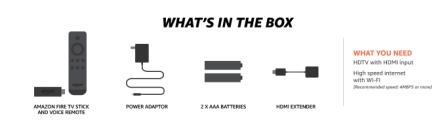
You can use the remote to browse different apps and content and it communicates with a Bluetooth technology. The remote also supports voice search for all the Amazon Prime content. You can also download the Fire TV remote app on your smartphone to navigate the interface.
Amazon Fire TV Stick – What can You Watch?
Isn’t this great? Being able to watch what you want based on your preferences. And with so many new web exclusives, Smart TVs will soon become a necessity for hardcore couch potatoes. Amazon Fire Stick give you access to all the Amazon Prime content. But it also gives you ability to watch content from other sources. Here’s the list of Amazon Fire TV Apps that are supported for now, and you can expect new ones added soon.
- Amazon Prime Video,
- Hotstar,
- Netflix,
- YouTube,
- Eros Now,
- Gaana
Internet Connectivity
The device does not have any storage capacity. So you will have to be connected to the internet at 4 MBPS plus connection to watch any content. A good broadband connection with lots of GBs is essential to enjoying any streaming services. And until you get that cheap, internet connectivity remains the pain point in these services.
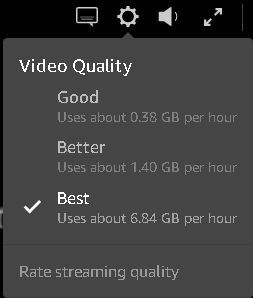
So how much data do you need to watch content on Amazon Fire TV stick? Let’s see. Amazon Prime content is available in roughly three formats – Good, Better Best. The data you will consume depends on the screen resolution. Let’s say you will watch all you content at 720P, on your 32 inch HDTV.
This setting will roughly gobble up somewhere around 3 GB of your monthly plan for an hour of online TV viewing. Now consider you watch at least one hour every day, you will need a plan that can provide you access to more than 100 GB per month at speeds higher than 4 MBPS.
Even when you opt for the lowest streaming quality, it will eat up roughly .3 GB for an hour, and require more than 10 GB a month at 4 MBPS or higher. This could easily translate to additional expense Rs. 2000 a month, roughly.
Amazon Fire Vs Chromecast 2
That is the question on everyone’s mind. Chromecast does offer similar services, except, it needs a smartphone to watch online content. The apps are installed on your phone and mirrored on the TV. This can be troublesome when you have your router busy getting content from the Internet and channeling it back to your TV. Moreover, you will need a smartphone with configuration high enough to manage the casting.
So to summarize our Amazon Fire TV Stick review, Amazon Fire TV stick looks like a better option than Chromecast 2, right now. But the way things are going, you could wait for a bit more and we are sure there will be something better that will come along.
Leave a Reply